
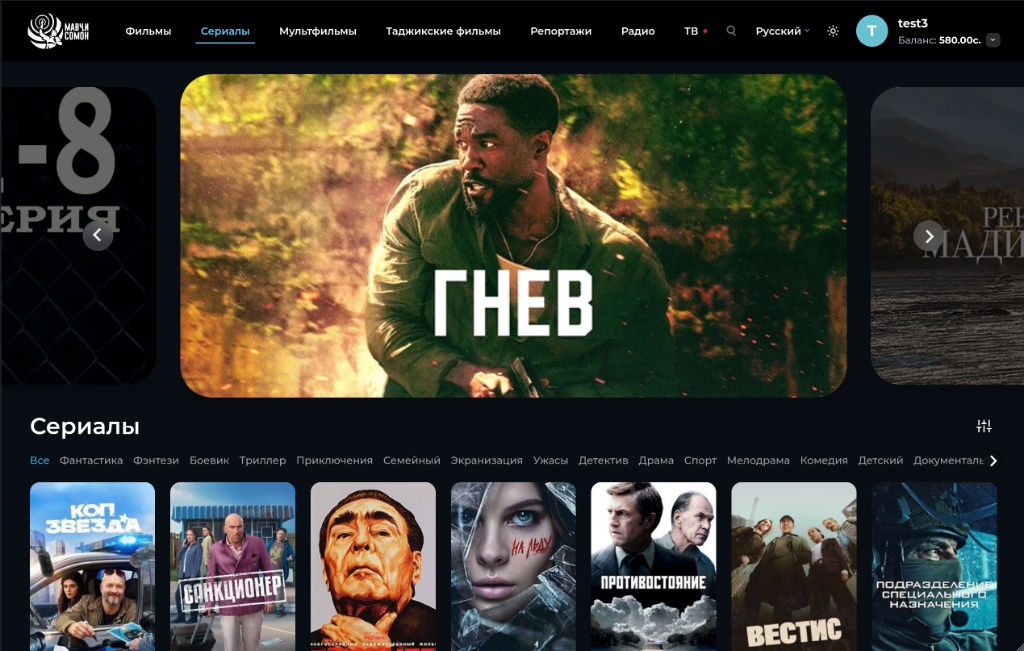
Section: Series
Multi-part content
Architecture of the "Series" section: dynamics of premieres, serial navigation, and binge-watching culture
The "Series" section is built similarly to movies, providing intuitive access to multi-part content. The main focus here is on the Hero Banner, which announces loud premieres or new seasons.
Under the slider is a convenient ribbon with genre filters (Action, Thriller, Comedy, etc.), which helps quickly narrow the search. Series cards are designed as vertical posters.
1. Specifics of the serial Hero Banner: focus on seasonality and novelty
The main promo slider of the category is adapted to the features of multi-part releases:
Informing about season status: Posters are supplemented with informative badges: "New Season", "All episodes available", "Season Finale", or "Ongoing".
Direct start from the current episode: The "Watch" button automatically adjusts to the viewer's status.
Trailers of specific seasons: Preview trailers open for the current season without spoiling previous parts.
2. Genre filtration and thematic sections
The interactive tag panel right below the slider solves the problem of orientation in long formats:
Quick mood selection: Tags are grouped to cut off unsuitable formats in one click.
Multiplicative filters: Additional switches: "Completed projects" and "Mini-series".
3. Architecture of the series content card
Vertical cards are designed with the needs of binge-watchers in mind:
Serial meta-information on Hover: The card reveals advanced parameters: total number of seasons and episodes, average episode length, audio tracks, and translation status.
Viewing progress indicator: A progress bar is displayed for active shows.
Playlists and bookmarks: The "Bookmark" button adds the whole series to the profile and notifies about new episodes.
4. Attention retention ecosystem and continuous experience
The unified visual code of the section eliminates barriers between selection and playback.